Red Ransomware: How RedCryptoApp Attacks, Encrypts Data, and Extorts Organizations

What is Red ransomware, and where did it originate?
Red Ransomware (also tracked as RedCryptoApp) is a ransomware group that became publicly visible in early 2024. It is associated with file encryption on compromised systems and the coercion of victims into paying a ransom to regain access. The group also maintains public victim listings and data disclosure through an extortion site, which can increase the impact on affected organizations.
When and how Red ransomware appeared
Available information indicates the group began targeting victims in mid-February 2024, with leak-site activity becoming visible in March 2024. The operators used this site to name victims and publish stolen data when ransom demands were not met.
The group operates a dedicated public victim listing (data leak site) as part of its extortion workflow. Unlike many established ransomware groups, Red’s data leak site appeared relatively new and rapidly deployed, consistent with an emerging extortion operation.
There is no reliable public information confirming the group’s geographic origin or verifiable ties to previously known ransomware collectives.
Targets of Red ransomware
Publicly observed victims are primarily organizations rather than individual home users. Documented victims include small and mid-sized businesses as well as larger enterprises, particularly those that depend on business-critical files and shared systems.
Early observed victims included multiple U.S.-based organizations, with additional cases observed in other regions. Early leak-site activity reflected a limited number of victim organizations, suggesting a relatively small but emerging operational footprint during the group’s initial public phase.
Why Red ransomware is dangerous
Red Ransomware is dangerous because it combines file encryption with the threat of data exposure, reflecting a double-extortion model that raises both operational and reputational stakes. Encryption can disrupt operations and block access to essential data, while potential data publication can introduce legal, regulatory, and customer-trust consequences.
Even organizations with backups may still face serious risk if sensitive data was taken before encryption and used for extortion.
Red Ransomware is tracked as a ransomware group rather than a single standalone malware variant and is associated with an extortion-focused model.
How Red ransomware enters systems
Reliable details about Red Ransomware’s initial access methods remain limited. During the same period, many ransomware intrusions leveraged widely exploited software vulnerabilities, including those in IT management and remote access platforms, as potential initial access paths. This does not confirm any exclusive or group-specific intrusion method, but it aligns with common access patterns observed across human-operated ransomware campaigns.
Attackers typically maintain unauthorized access for a period before deploying encryption to maximize operational impact.
Access conditions and security gaps that enable intrusion
Although exact intrusion techniques have not been publicly documented, observed Red Ransomware activity is consistent with environments that expose common security weaknesses. These include externally accessible systems that provide direct paths into internal networks, the use of valid but compromised credentials, outdated or poorly monitored services, excessive internal privileges, and limited visibility into authentication and remote access activity.
These factors do not represent confirmed techniques unique to Red Ransomware. Instead, they reflect the minimum access conditions typically required for targeted, human-operated ransomware activity.
What happens after the initial breach
Encryption is not deployed immediately after initial access. Instead, attacks typically move through a preparation phase in which unauthorized access remains active while operators position themselves to maximize impact.
During this period, victims often see no obvious ransomware indicators: files remain accessible, business applications continue to function, no ransom notes appear, and file extensions do not change. This low-visibility window makes early detection difficult.
Encryption, extortion, and signs of infection
Once RedCryptoApp is executed within the compromised environment, the attack becomes immediately visible. Files become inaccessible, operations are disrupted, and multiple indicators signal that encryption has occurred on affected systems.
What gets encrypted
RedCryptoApp encrypts user and business data accessible from the compromised environment, including local systems and reachable storage locations. In practice, this results in the loss of access to documents, project files, media, archives, and other operational data required for daily work.
System files required for basic functionality are typically left intact, allowing systems to remain operational enough for victims to view instructions and assess the situation.
How extortion is presented
After encryption, victims are informed that their data has been locked and that recovery requires direct interaction with the attackers. In addition to encryption, the group uses a public leak site to list victims and apply pressure through potential data exposure.
File extensions
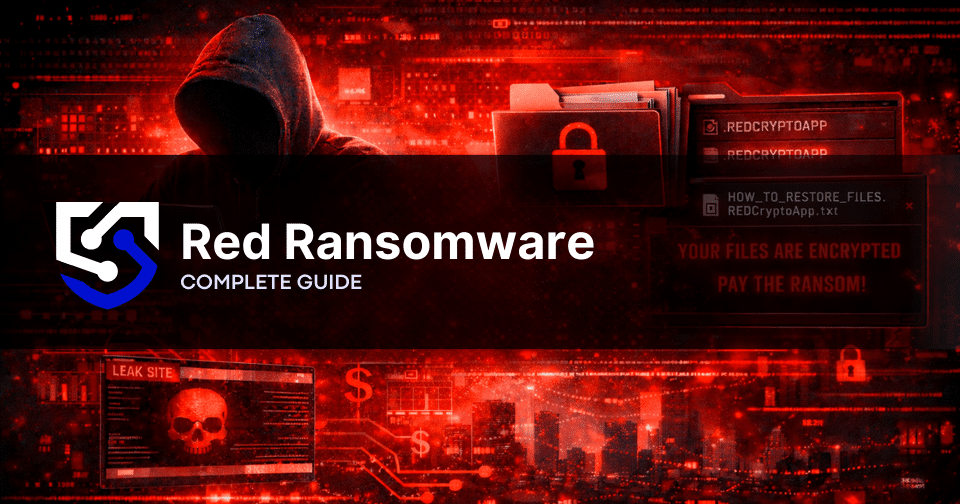
A clear technical indicator of infection is the modification of file names. Encrypted files are appended with the extension: .REDCryptoApp
This extension is applied consistently and can be used to identify affected files within the environment.
Messages and ransom notes
RedCryptoApp leaves a ransom note on affected systems containing instructions for the victim. The note is typically named: HOW_TO_RESTORE_FILES.REDCryptoApp.txt
The message confirms that encryption has taken place and outlines the steps the victim is expected to follow. No files are restored at this stage, and the presence of the note serves as confirmation of an active ransomware incident.
Technical indicators
Alongside file changes and ransom instructions, incidents associated with Red commonly show additional higher-level indicators consistent with the group’s extortion workflow:
- A dedicated public victim listing (data leak site) names organizations and applies pressure when extortion demands are not met
- References to a negotiation portal, often titled “Company Recovery,” which serves as the primary communication channel and typically requires a victim-specific identifier (hash or case ID) and CAPTCHA for access.
- Messaging that implies data theft and the threat of publication alongside encryption (double-extortion pressure).
What to do immediately after infection
Once a Red Ransomware infection is identified, the immediate priority is containment and preservation, not investigation or recovery. Early actions should focus on limiting further impact while avoiding changes that could complicate incident response efforts.
First actions
As soon as the infection is discovered, stop using the affected device immediately. Avoid modifying encrypted files in any way, and do not run unapproved cleanup tools or scripts. At this stage, the goal is to prevent additional damage, not to attempt recovery or remediation.
Isolate the affected system
Immediate isolation helps prevent ransomware from spreading to other devices, shared storage, and connected services. This typically involves disconnecting the affected system from all networks, removing access to external storage, such as USB drives or attached backup disks, and restricting access to shared folders or network storage as quickly as possible.
If reliable network isolation is not possible and encryption is actively spreading, powering the system down may be a last resort to stop further damage, but it can also reduce forensic visibility. When possible, prioritize containment through network isolation or centralized controls before shutting systems off.
Document the incident with minimal interaction
Document the incident, but keep interaction with the infected system to an absolute minimum. Record the essentials and store them on a separate, clean device or account:
- Date and time the issue was first noticed, as well as how it was identified
- Which devices and user accounts appear affected
- What changed (drives, folders, or business functions that became unavailable)
If you can capture the ransom message quickly without exploring the system, document it and stop. Avoid additional navigation, troubleshooting, or “testing.”
Data recovery options
Once the infection has been contained, the focus can shift to restoring access to data and stabilizing operations. Recovery should be planned to restore business continuity safely, not merely to bring systems back online.
Restoring data from backups
Restoring data from clean, pre-incident backups is the most reliable recovery option. Backups should only be used after affected systems have been isolated and prepared for restoration.
Before restoring data, confirm that backups were created prior to the infection, verify that they were not accessible from the compromised environment, and restore data only to systems that have been rebuilt or verified as clean. Using compromised or unverified backups can lead to reinfection or incomplete recovery.
Possibility of decryption
In some cases, encrypted data may become recoverable without payment if decryption tools or recovery methods become available in the future.
At the time of writing, no widely trusted public decryptor is known for Red Ransomware. Encrypted files should be preserved exactly as they are. Renaming, deleting, or altering them can permanently remove future recovery possibilities.
Paying a ransom does not guarantee full data recovery and may result in further demands.
When to involve recovery specialists
Professional assistance should be considered when no usable backups are available, when encrypted data is business-critical or time-sensitive, or when the scope of data loss is unclear. Specialists can assess recovery feasibility, preserve remaining data, and guide restoration efforts without direct interaction with attackers.
How to protect yourself from Red ransomware
Protection against Red Ransomware is about reducing the chances of a compromise and limiting the impact if one occurs. No single control prevents every ransomware incident, so the goal is layered defense: strong basics, disciplined access control, and recoverable backups.
Security practices
A ransomware incident is far less likely when routine security hygiene is applied consistently across endpoints, servers, and cloud services.
Focus on:
- Timely patching for operating systems, browsers, office apps, VPNs, and high-risk internet-facing services such as IT management and remote access platforms, which have been linked to real-world ransomware intrusions when left unpatched or misconfigured.
- Reducing attack surface by disabling unused services, removing unnecessary remote access paths, and limiting exposed management interfaces
- Email and web hardening, including attachment controls and blocking risky file types where practical
- User awareness that helps prevent credential theft and unsafe downloads
These measures significantly reduce the most common access paths used in ransomware intrusions.
Backups
Backups are the most reliable way to recover without paying, but only if they are isolated and testable.
Protective backup habits:
- Keep at least one backup copy offline or logically isolated, preventing access from production systems
- Maintain multiple backup generations (versioning) to recover from “quiet” compromise periods
- Test restores regularly, not just backup jobs, to confirm recoverability
- Restrict who can access and modify backup storage, and separate backup admin accounts from everyday IT accounts
Backups that are always connected and writable from the same environment offer limited protection against targeted ransomware.
Access control
Strong access control limits how far an attacker can move after an initial breach and how much they can encrypt.
Key controls:
- Multi-factor authentication (MFA) for email, VPN, remote administration, and privileged accounts
- Least privilege: users should only have the access needed for their role, nothing more
- Separate admin accounts for privileged work instead of using a single account for daily activity
- Limit and monitor remote access, including where it’s allowed from and who can use it
The tighter the access boundaries, the harder it is for ransomware operators to reach shared storage, backups, and high-value systems.
What this means for organizations
Red Ransomware shows how quickly an emerging threat can become a business-level incident when unauthorized access goes undetected. In these situations, outcomes are shaped less by the malware itself and more by how quickly containment happens and how disciplined the early decisions are. Organizations that engage incident response support early are typically better positioned to scope affected systems, reduce unnecessary disruption, and preserve the information needed for follow-on recovery planning. When encryption impacts business-critical data, structured recovery support can help identify safe restoration paths while minimizing reinfection risk and extended downtime. In ransomware incidents, time directly affects recovery options, and delays tend to narrow them.
Written by
Bogdan Glushko is the CEO of Proven Data, where he leads the mission to bridge the gap between emergency incident response and proactive digital defense. With over 20 years of experience in the technology and data recovery sectors, Bogdan has overseen the resolution of 3,000+ cyber incidents and spearheaded the development of the Lynx security platform.